Plusfeed
TON Poker is a poker room that runs right inside Telegram. Money goes in and out in crypto, so beginners usually have one question: how do I put money in and how do I take it out? Below is everything step by step, based on the room’s official help page. Where the help page is silent, we say so.
In poker you can both lose and win. Believe in yourself and study game strategy to work towards victory. Adults only (18+).
What to know before you start
- You can play and deposit from Telegram, with nothing to install.
- Your balance in the room is kept in dollars. Whatever coin you deposit is converted to USD at the rate the bot shows on the payment method’s page. The rate may differ slightly.
- The room has one withdrawal method: USDT on the TON network. You can deposit with several coins but you can only withdraw in USDT. That matters if you deposited a different coin.
Open the bot with the “Try it now” button on this page, and don’t send money to bots that message you first: Telegram is full of lookalikes of popular services.
How to deposit
- Open the TON Poker bot and tap Deposit.
- Pick one of the available cryptocurrencies. For each one the bot shows the minimum deposit and the network fee. On the screen below (November 6, 2026) these are USDT on TON, TON, Cryptobot and xRocket. The numbers can change over time, so check them in the bot before you send anything.
- Copy the address or scan the QR code and send the transfer. For the TON network you can open your wallet straight from the bot.
- Wait for your balance to update. It usually takes 1–5 minutes.
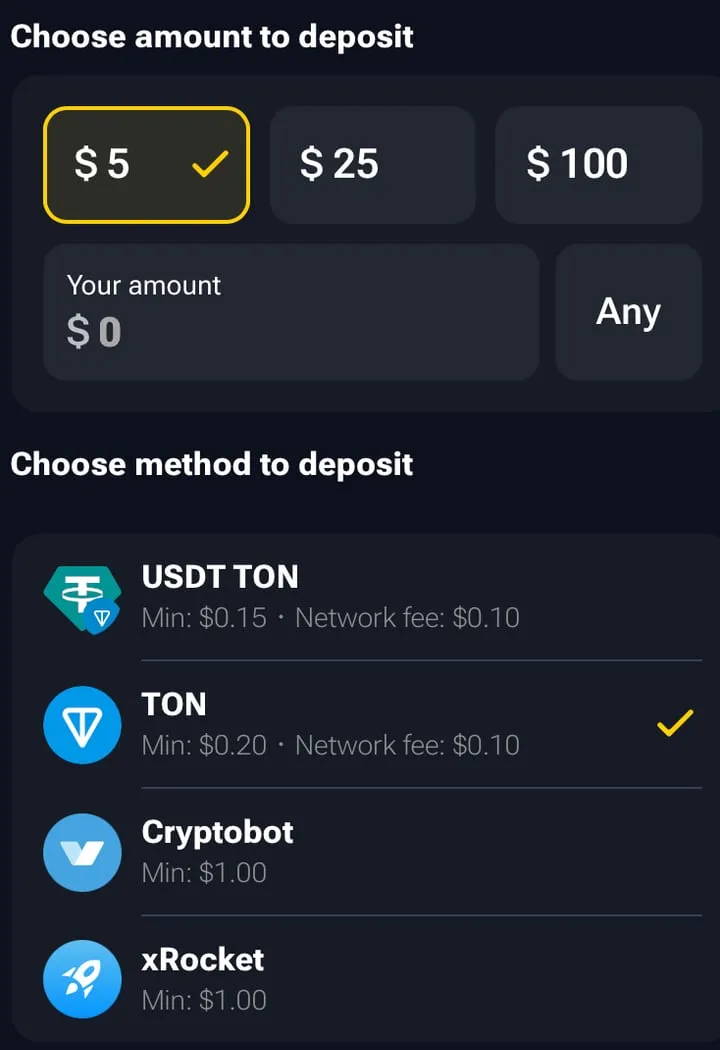
The deposit screen: $5, $25, $100 or your own amount at the top, deposit methods with their minimum and network fee below.
What else the help page says:
- The room charges no deposit fee, only the network fee.
- Send funds only to the address the bot shows, on the network you picked. A transfer on the wrong network usually can’t be recovered.
- Transfers from an exchange can take longer, because the exchange processes the withdrawal itself.
If you haven’t used a crypto wallet before, how to use a crypto wallet safely and how hot wallets differ from cold ones are worth a read.
How to withdraw
- Open the bot and tap Withdraw.
- If no wallet is linked yet, link one first. It can be an exchange wallet or a regular wallet where you hold the keys. You can link up to two wallets and switch between them; manage them under More.
- Enter the amount and tap Review Withdrawal.
- Check the network fee and the final amount, then tap Withdraw to confirm.
Funds usually arrive within 1–2 minutes. If it takes longer, the help page suggests contacting support.
Double-check the address before you confirm, especially for a large amount. TON addresses are updated from time to time, and a transfer to a wrong address can’t be reversed.
Minimums and fees
| What the help page says | |
|---|---|
| Room fee on deposits | none |
| Minimum deposit | USDT on TON from $0.15, TON from $0.20, Cryptobot and xRocket from $1 (per the bot screen on 6.11.2026) |
| Network fee on deposits | about $0.10 for USDT TON and TON; not shown for Cryptobot and xRocket |
| Withdrawal method | USDT on the TON network only |
| Minimum withdrawal | $3 |
| Room fee on withdrawals | none |
| Network fee on withdrawals | about $0.40 |
| Withdrawal time | about 1–2 minutes |
Maximum limits are not stated on the help page. Terms can change, so check the numbers in the bot before a large transfer.
If something goes wrong
- Balance didn’t update. Wait 5–10 minutes and check the transaction in a blockchain explorer. If it’s confirmed there but your balance is unchanged, contact support and include the transaction hash.
- Withdrawal didn’t arrive. Check that the address accepts USDT on the TON network, not TRC-20 or ERC-20. An exchange wallet sometimes shows different addresses for different networks.
- Identity check. The help page says nothing about document checks, and we found no official statement either way, neither “never any checks” nor the opposite. If you’re counting on a large withdrawal, ask support first.
FAQ
How do I deposit into TON Poker?
In the bot, tap “Deposit”, pick a coin, copy the address or scan the QR code and send the transfer. Your balance usually updates within 1–5 minutes.
Is there a deposit fee?
The room charges no deposit fee. You only pay the network fee, and the bot shows its size for each coin.
How do I withdraw from TON Poker?
Only in USDT on the TON network. In the bot, tap “Withdraw”, link a wallet, enter the amount, check the fee and confirm. It usually takes 1–2 minutes.
What are the minimum withdrawal and the fee?
According to the room’s help page, the minimum is $3, there is no room fee, and the network fee is about $0.40.
Can I withdraw to an exchange?
Yes, the help page says you can withdraw to an exchange wallet or to a non-custodial wallet. Just make sure the address accepts USDT on the TON network specifically.
My withdrawal hasn’t arrived. What now?
If more than a couple of minutes have passed, first check the transaction in a blockchain explorer. If there’s nothing there, contact the room’s support.