Plusfeed
How much did you make or lose in crypto this month? Not “what’s on my balance right now”, but the actual result of your investments. Until now, in Walt (formerly Telegram Wallet) you had to work that out in your head. Now the app has portfolio analytics, the fifth and final update in the #WaltStreet series.
Here’s where to find it and how to make sense of the numbers.
How to open analytics
- Open Walt in Telegram (@walt).
- On the main screen, top right, just below the three-dot button, tap the round button with the pie chart icon.
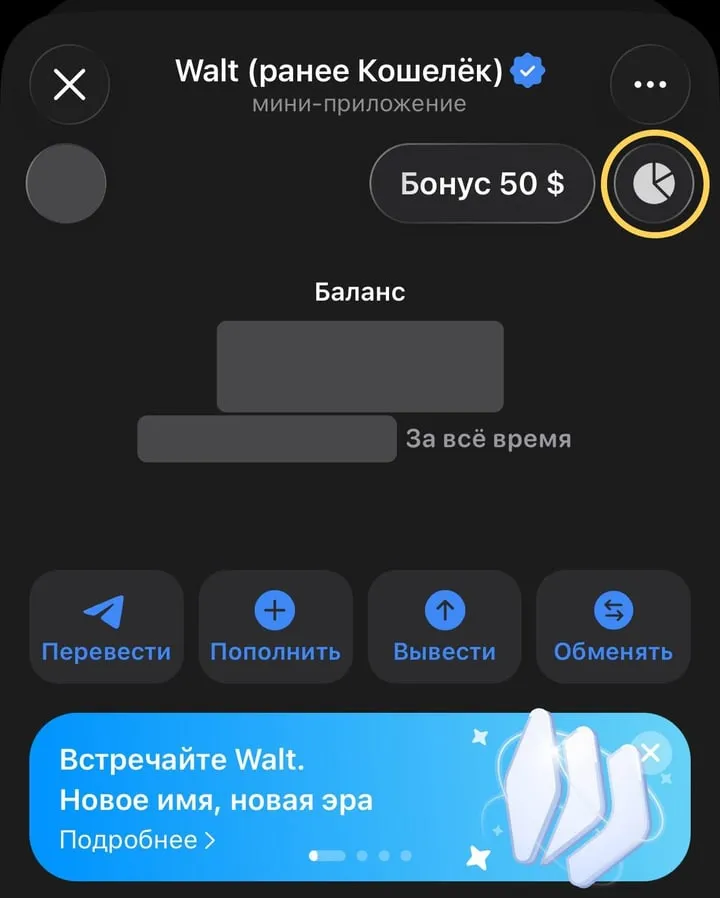
The analytics button is circled. Screenshots are from the Russian-language interface, amounts hidden.
This opens the portfolio analytics screen.
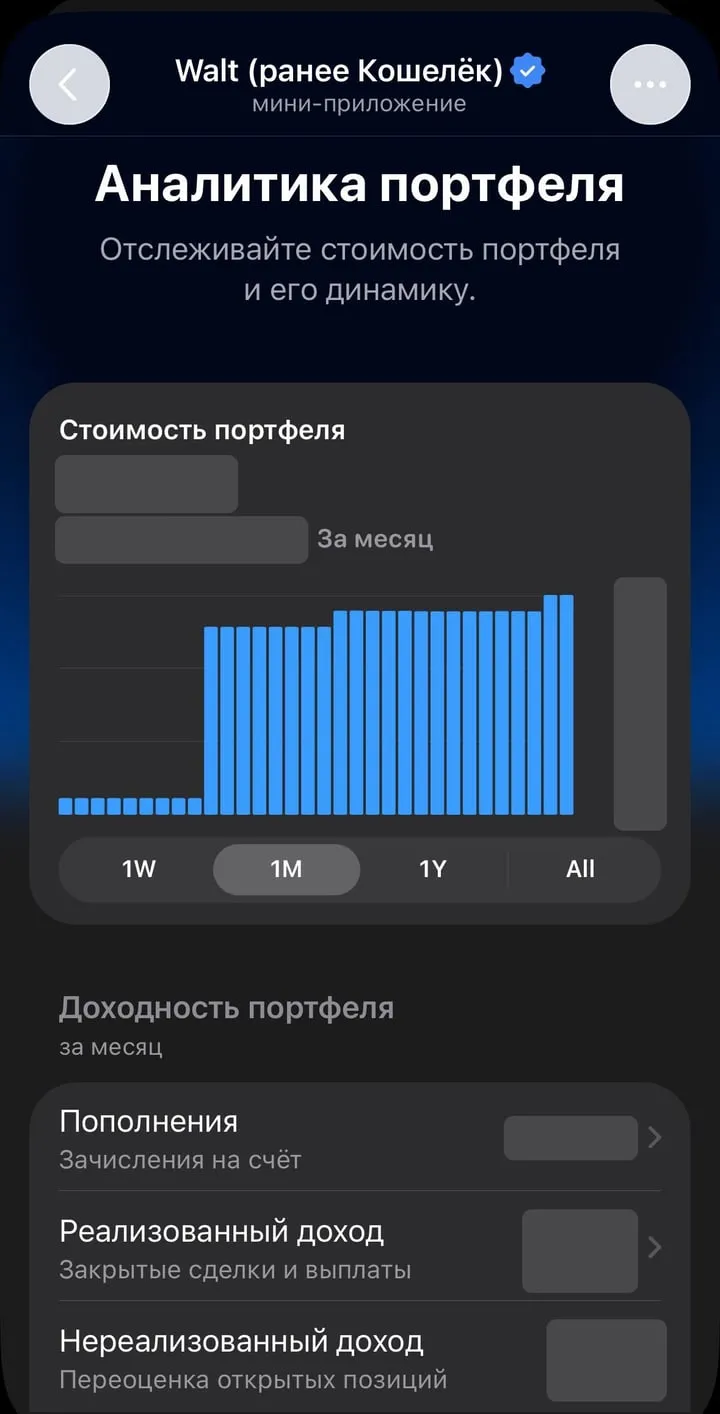
Portfolio value and chart at the top, the breakdown of your result below.
What it shows
Portfolio value: what everything in your Walt account is worth now, and how much that changed over the selected period. Below the chart there’s a switch: 1W (week), 1M (month), 1Y (year) and All (all time). Each bar on the chart is one day.
Further down, the portfolio returns block breaks your result into parts:
- Deposits: how much money you added to your account in the period;
- Realized PnL: closed trades and payouts, such as Earn;
- Unrealized PnL: the revaluation of open positions, meaning the coins you hold.
Realized plus unrealized PnL gives you your total return, the answer to “am I up or down”. The all-time change is also shown right on the main screen, under your balance.
PnL in plain words
PnL stands for Profit and Loss. In Walt it comes in two parts.
Realized PnL is money that’s already yours. You bought a coin for 100 USDT and sold it for 115, so your realized PnL is +15 USDT. Walt also counts Earn payouts here.
Unrealized PnL is profit or loss “on paper”. You bought GRAM for 200 USDT and it’s now worth 230. Your unrealized PnL is +30 USDT, but if the price falls before you sell, those 30 can disappear.
So a nice green unrealized number isn’t a reason to celebrate yet: the result is locked in only once you sell.
Why deposits are shown separately
This is the most useful part of the update. Your balance grows not only from gains but also when you simply add money. If you only look at the balance, it’s easy to think you’re up when your trades actually lost money.
A one-month example:
| What happened | Amount |
|---|---|
| Portfolio at the start of the month | 500 USDT |
| Deposited | +100 USDT |
| Withdrew to a card | −50 USDT |
| Realized PnL (trade +15, Earn payout +5) | +20 USDT |
| Unrealized PnL (GRAM went up) | +30 USDT |
| Portfolio at the end of the month | 600 USDT |
Your balance went up by 100 USDT, but only 50 of that is what you earned: 20 realized plus 30 unrealized. The rest is your own money going in and out. Walt’s analytics sorts exactly this out for you.
What else Walt has for trading
#WaltStreet is a series of trading updates. According to Walt’s official help center (trading section, updated October 30, 2026), the app currently has:
- a market heatmap: the top 30 tokens by 24-hour volume, refreshed about every 5 minutes;
- a Watchlist to follow prices of coins, even ones you don’t hold;
- limit buy orders that fill when the price reaches your level, up to 5 per asset;
- Take Profit and Stop Loss: an automatic sell when the price rises or falls to a set level;
- perpetual futures and tokenized stocks, only in some countries and after verification.
The fee for regular trades depends on your tier (Settings → Tiers). Trading requires basic verification.
Things to keep in mind
- Analytics shows the past, not the future. A good month doesn’t mean the next one will be good too.
- Unrealized PnL moves with the price, sometimes a lot in a single day.
- Fees. The announcement doesn’t say exactly how Walt factors fees into PnL. If you need your result to the cent, check your transaction history.
- Availability depends on your country. Some Walt features aren’t available everywhere. Walt’s announcement also states it isn’t intended for people in the United Kingdom.
If you’re new to the app, start with our overview of what Walt is. How to move money out to a card or an exchange is covered in how to withdraw from Walt. And for the GRAM coin and its Earn, see Gram (formerly Toncoin).
FAQ
Where is portfolio analytics in Walt?
On Walt's main screen, top right, just below the three-dot button, there's a round button with a pie chart icon. It opens the portfolio analytics screen.
What is PnL?
Profit and Loss. Realized PnL is what you've already received from closed trades and Earn payouts. Unrealized PnL is how much the value of the coins you still hold has changed.
Do deposits count as profit?
No. Walt shows deposits on a separate line and leaves them out of your returns. Your balance can grow even if you earned nothing, simply because you added money.
If a coin went up but I didn't sell it, is that profit?
For now it's unrealized PnL, a profit on paper. If the price drops before you sell, it shrinks or disappears. It only becomes realized once you sell.
Are Earn payouts included?
Yes. According to Walt, Earn payouts are part of realized PnL, together with the result of closed trades.
This is a referral link: we may earn a commission.